Construction task management software
Make the next action clear to every crew.
Give each task a result, responsible people and a location. Plan the week, follow progress and keep updates from the field attached to the work.
Subscribe in the iPhone app through Apple.
How the workflow works
Define and assign the work
Choose one or more responsible people. Add the location, priority and optional start time or deadline. Include checklist items when the result needs several steps.
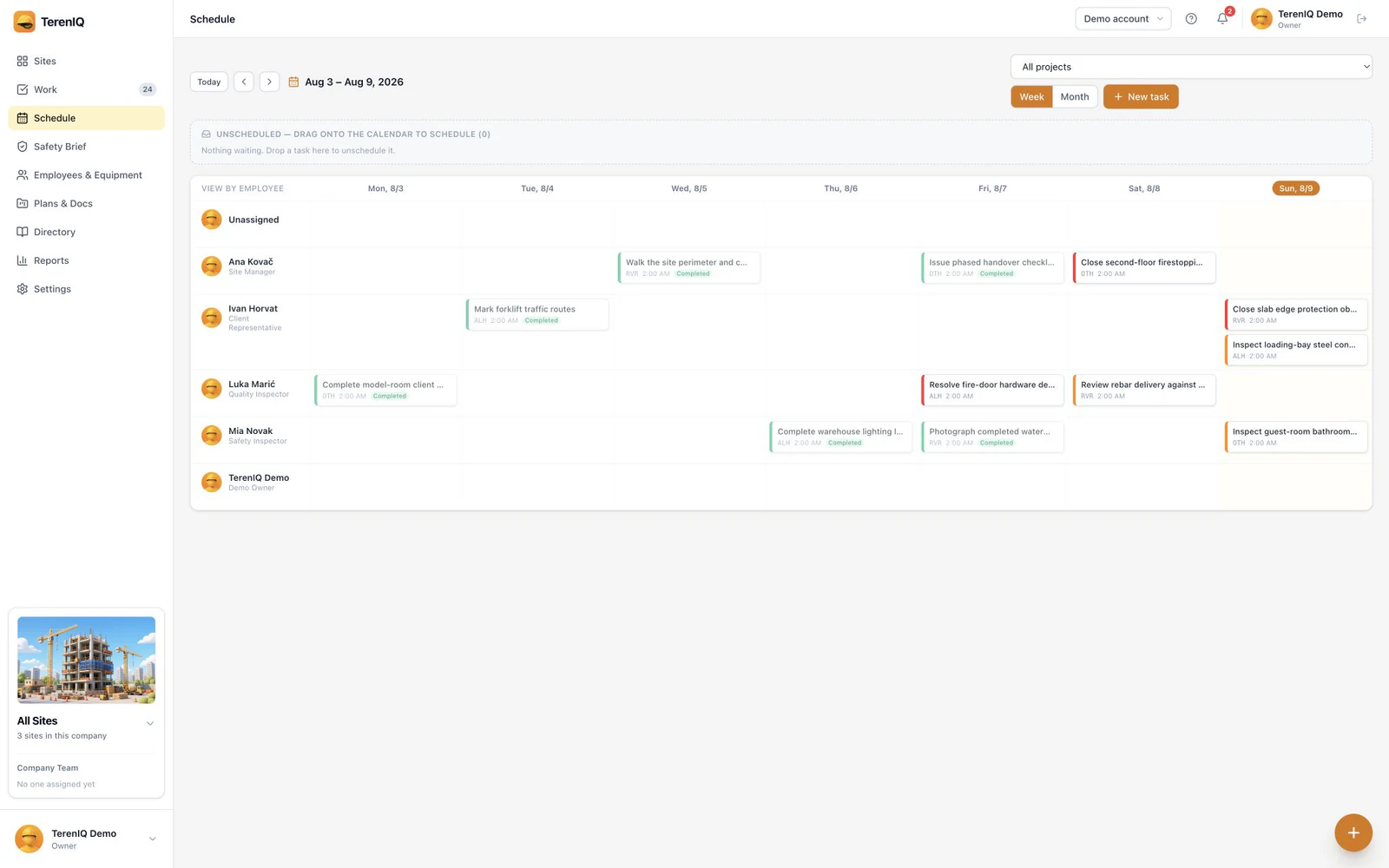
Plan the week
Review the team's work in the schedule. Check site access, material and preceding tasks before promising a completion date to another crew.
Keep progress in context
Update the status and add comments, photos, video, voice notes or documents when useful. Mark blocked work clearly and name the action needed to release it.
From the weekly plan to the task record
Use the schedule to review who is doing what, and the task record for the details. A subcontractor's next action should have an identifiable owner and location. Agree responsibilities before inviting people into the workspace.
Practical guides and templates
Questions about this workflow
Can several people own a task?
Yes. Tasks can have more than one responsible person. Make each person's expected action clear in the task description or checklist.
Is a checklist required for every task?
No. Checklists, times and attachments are optional. Add them when they make the result easier to perform or review.