How to manage construction tasks without WhatsApp and spreadsheets
Move construction tasks out of WhatsApp and spreadsheets by giving every piece of work one shared record: a clear scope, named assignees, priority, timing, location, current status and the discussion or files needed to act. Messaging can still handle conversation, but it should not be the only place where the team must find assigned work.
What the shared task record must contain
- Scope: one specific result, written so the assignee can tell what needs to change.
- Responsible people: everyone expected to act, not only a trade or company name.
- Priority and timing: urgency plus a start or due time when the sequence depends on it.
- Location: a site area, level, grid reference, drawing or drawing pin.
- Status and blocker: not started, in progress, blocked or completed, with the reason when progress stops.
- Working context: checklist items, comments, photos, video, voice notes or documents when they help the crew act.
If any of these fields lives only in somebody's memory or in a separate chat, the team still has two versions of the task.
Move the team in five practical steps
-
Choose one source of truth
Decide where active tasks are created, updated and closed. Keep the rule simple: a message can start a conversation, but assigned work must exist in the shared task list.
-
Start with active work
Do not copy years of old spreadsheets. Move the open work that someone still needs to complete, then archive the old file as reference.
-
Clean each task as it moves
Split bundled instructions into separate outcomes, name the assignees, add a location and set a realistic priority or due date.
-
Put updates on the task
Comments, blockers and field attachments belong with the item. The team can still discuss urgent matters by phone, then add the decision to the task.
-
Review one queue every day
Foremen review today's and blocked work; managers review overdue and high-priority items. A shared list only replaces the spreadsheet when the team uses it to run the day.
Where WhatsApp still fits
WhatsApp is useful for a quick call, a heads-up or a conversation that needs an immediate response. The problem begins when the message itself becomes the task register. A group chat cannot reliably show every open item by assignee, due date, location and status, and a spreadsheet cannot carry the discussion and field context without becoming another manual copy.
Use messaging for communication. Use the shared task record for responsibility and follow-through. That boundary is more important than the particular tools the team chooses.
Doing this in TerenIQ
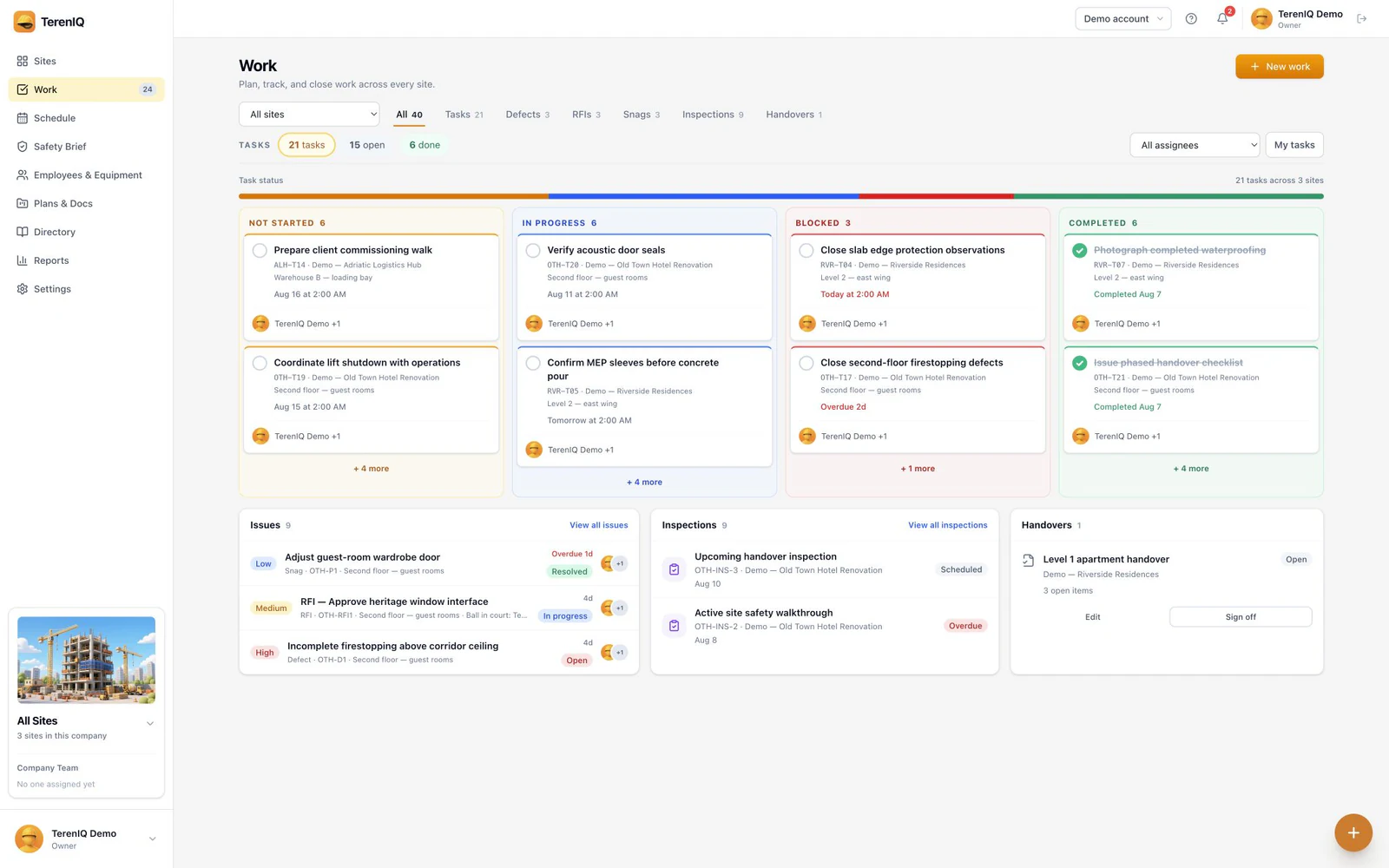
TerenIQ keeps the working parts of a site task together:
- Assign one task to one or more team members and add its priority plus optional start and due times.
- Add a site label, grid reference, drawing or drawing pin when the work needs precise location context.
- Use optional checklist items, comments and photo, video, voice or document attachments.
- Follow the task through not started, in progress, blocked and completed states, with assignment and status notifications.
Frequently asked questions
Can WhatsApp be used for construction task management?
It can support conversation, but it is weak as the only task register because open work is difficult to review consistently by assignee, due date, location and status.
Should we import every old spreadsheet task?
Usually not. Move active work that still needs action, clean each item as it moves, and keep the old spreadsheet as a dated archive.
What is the minimum information every site task needs?
A specific outcome, responsible people and enough location or timing context to act. Add priority, due dates, checklist items and attachments only when they make the task clearer.